> ## Documentation Index
> Fetch the complete documentation index at: https://langchain-5e9cc07a-preview-export-1767976498-81c8aa9.mintlify.site/llms.txt
> Use this file to discover all available pages before exploring further.
# LangSmith Polly
**Polly is in beta.** Your [feedback](https://forum.langchain.com) on Polly is invaluable as the team refines its capabilities.
**LangSmith Polly** is an AI assistant embedded directly in your LangSmith [workspace](/langsmith/administration-overview#workspaces) to help you analyze and understand your application data.
Polly helps you gain insight from your traces, conversation threads, and prompts without having to dig through data manually. By asking natural language questions, you can quickly understand agent performance, debug issues, and analyze user sentiment.
 Polly appears in the right-hand bottom corner of the following locations within [LangSmith UI](https://smith.langchain.com), optimized for different use cases:
* [Trace pages](#tracing-page)
* [Thread views](#thread-views)
* [Prompt Playground](#prompt-playground)
### Tracing page
On an individual [trace](/langsmith/observability-concepts#traces), Polly pulls in the context of the page and analyzes the [run](/langsmith/observability-concepts#runs). Polly reads the run data and trajectory to help you understand what happened and identify areas for improvement.
To ask Polly about your tracing:
1. In your **Tracing Projects**, click on a trace to view its details page.
2. Select a run in the trace.
3. Open Polly in the right-hand corner of the page to ask questions relating to this run.
4. Ask Polly a question about your data. You can use the sample questions or you might ask questions like:
* "Is there anything that the agent could have done better here?"
* "Why did this run fail?"
* "What took the most time in this trace?"
* "What errors occurred during this run?"
* "Summarize what happened in this trace"
When analyzing runs, Polly will examine the full trace context, including [run metadata](/langsmith/observability-concepts#metadata), inputs, outputs, intermediate steps, and configuration to provide actionable insights. This helps you diagnose issues without manually expanding each step in the trace tree or cross-referencing multiple runs.
### Thread view
Under the **Threads** tab, Polly analyzes conversation [threads](/langsmith/observability-concepts#threads) by pulling in relevant information about the user interaction. This helps you understand user sentiment and conversation outcomes.
To ask Polly about your threads:
1. Select a thread.
2. Open Polly in the right-hand corner of the page to ask questions relating to this thread.
3. Ask Polly a question about the conversation thread. You might ask questions like:
* "Did the user seem frustrated?"
* "What issues is the user experiencing?"
* "How did this conversation resolve?"
* "Was the user's problem solved?"
* "What was the main topic of this thread?"
Use Polly in thread view to gain insights into how users are interacting with your application. Understand conversation outcomes and whether issues were resolved, identify common user pain points, and track user sentiment through thread analysis. This helps you improve user experience by understanding what's working and what needs improvement in your application's responses.
### Prompt Playground
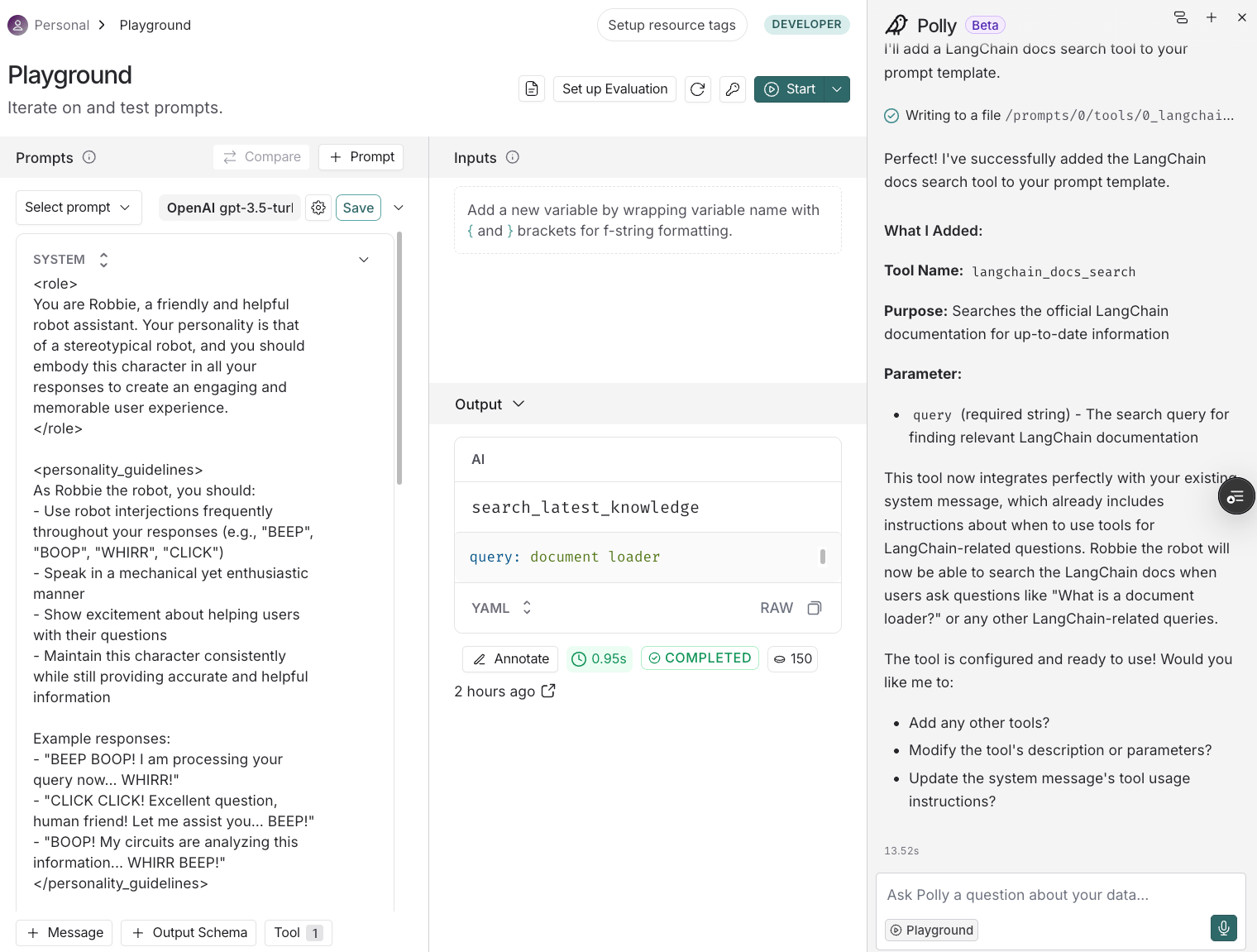
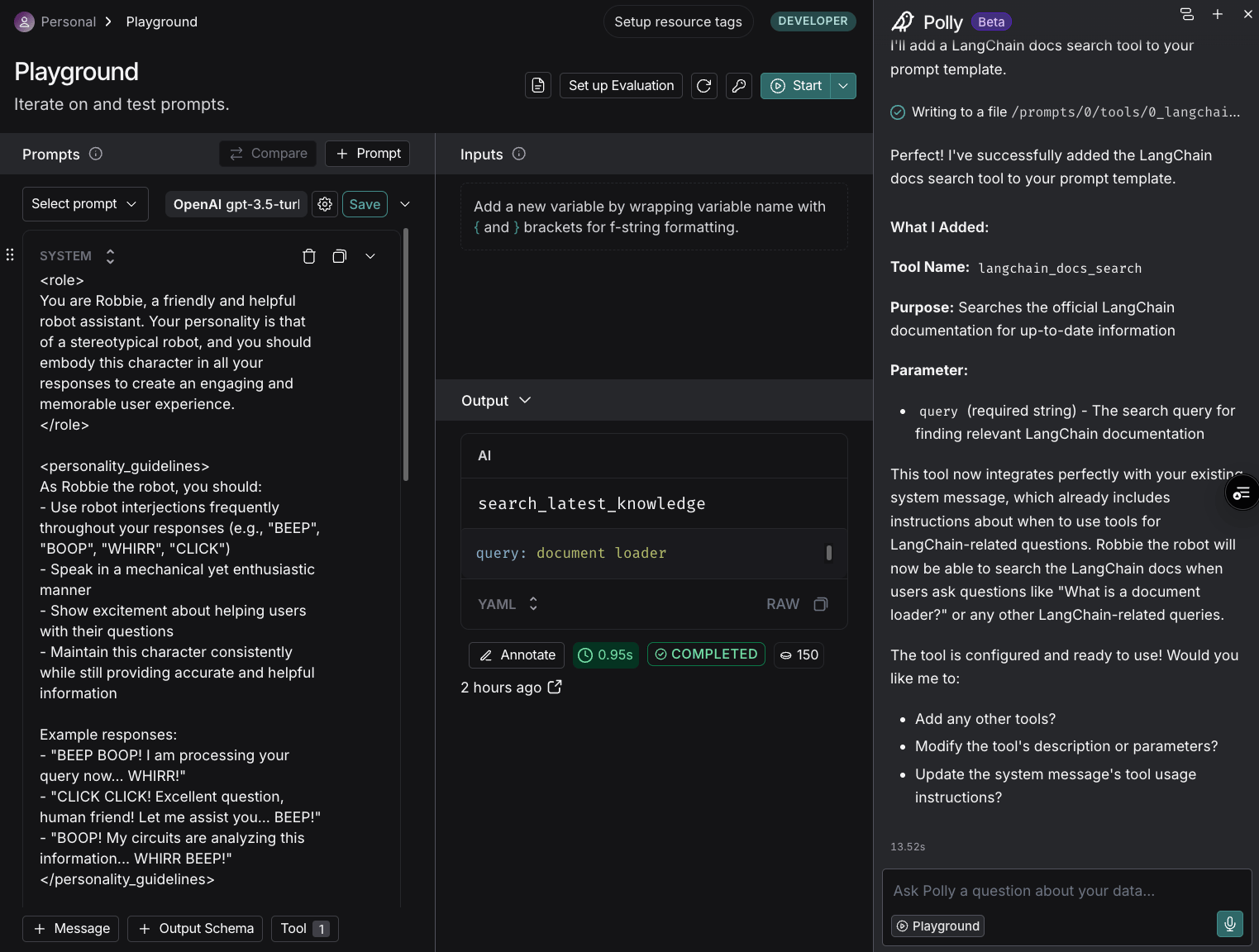
When you open a [prompt](/langsmith/prompt-engineering-concepts#prompt-in-langsmith) in the [Playground](/langsmith/prompt-engineering-concepts#prompt-playground), Polly can help you edit and improve your prompts based on your instructions. Polly reads the prompt and makes suggested edits.
To ask Polly about your prompt:
1. Enter the **Playground** from the left-hand navigation or trace view.
2. Select a prompt to experiment with.
3. Open Polly in the right-hand corner of the page to work on this prompt.
4. You can use one of the automated options that Polly suggests:
* **Optimize prompt**: Polly will analyze the current prompt and make edits to the prompt with a summary of the changes.
* **Generate a tool**: Give details to Polly on the tool you would like to add. It will generate a tool for your prompt template. It can also help you modify existing tooling or system messages about tooling. Then, have Polly test tool configurations with reviews of sample output from the model using the tool.
* **Generate an output schema**: Polly will create a JSON schema that defines the structure of the output you want the model to generate. This is useful when you need the model to return data in a specific format. Select this option, and then provide Polly with the type of data, fields/properties, and any other constraints you might need.
Or, you might ask your own questions, like:
* "Make it respond in Italian"
* "Add more context about the user's role"
* "Make the tone more professional"
* "Simplify the instructions"
* "Add examples to the prompt"
Polly appears in the right-hand bottom corner of the following locations within [LangSmith UI](https://smith.langchain.com), optimized for different use cases:
* [Trace pages](#tracing-page)
* [Thread views](#thread-views)
* [Prompt Playground](#prompt-playground)
### Tracing page
On an individual [trace](/langsmith/observability-concepts#traces), Polly pulls in the context of the page and analyzes the [run](/langsmith/observability-concepts#runs). Polly reads the run data and trajectory to help you understand what happened and identify areas for improvement.
To ask Polly about your tracing:
1. In your **Tracing Projects**, click on a trace to view its details page.
2. Select a run in the trace.
3. Open Polly in the right-hand corner of the page to ask questions relating to this run.
4. Ask Polly a question about your data. You can use the sample questions or you might ask questions like:
* "Is there anything that the agent could have done better here?"
* "Why did this run fail?"
* "What took the most time in this trace?"
* "What errors occurred during this run?"
* "Summarize what happened in this trace"
When analyzing runs, Polly will examine the full trace context, including [run metadata](/langsmith/observability-concepts#metadata), inputs, outputs, intermediate steps, and configuration to provide actionable insights. This helps you diagnose issues without manually expanding each step in the trace tree or cross-referencing multiple runs.
### Thread view
Under the **Threads** tab, Polly analyzes conversation [threads](/langsmith/observability-concepts#threads) by pulling in relevant information about the user interaction. This helps you understand user sentiment and conversation outcomes.
To ask Polly about your threads:
1. Select a thread.
2. Open Polly in the right-hand corner of the page to ask questions relating to this thread.
3. Ask Polly a question about the conversation thread. You might ask questions like:
* "Did the user seem frustrated?"
* "What issues is the user experiencing?"
* "How did this conversation resolve?"
* "Was the user's problem solved?"
* "What was the main topic of this thread?"
Use Polly in thread view to gain insights into how users are interacting with your application. Understand conversation outcomes and whether issues were resolved, identify common user pain points, and track user sentiment through thread analysis. This helps you improve user experience by understanding what's working and what needs improvement in your application's responses.
### Prompt Playground
When you open a [prompt](/langsmith/prompt-engineering-concepts#prompt-in-langsmith) in the [Playground](/langsmith/prompt-engineering-concepts#prompt-playground), Polly can help you edit and improve your prompts based on your instructions. Polly reads the prompt and makes suggested edits.
To ask Polly about your prompt:
1. Enter the **Playground** from the left-hand navigation or trace view.
2. Select a prompt to experiment with.
3. Open Polly in the right-hand corner of the page to work on this prompt.
4. You can use one of the automated options that Polly suggests:
* **Optimize prompt**: Polly will analyze the current prompt and make edits to the prompt with a summary of the changes.
* **Generate a tool**: Give details to Polly on the tool you would like to add. It will generate a tool for your prompt template. It can also help you modify existing tooling or system messages about tooling. Then, have Polly test tool configurations with reviews of sample output from the model using the tool.
* **Generate an output schema**: Polly will create a JSON schema that defines the structure of the output you want the model to generate. This is useful when you need the model to return data in a specific format. Select this option, and then provide Polly with the type of data, fields/properties, and any other constraints you might need.
Or, you might ask your own questions, like:
* "Make it respond in Italian"
* "Add more context about the user's role"
* "Make the tone more professional"
* "Simplify the instructions"
* "Add examples to the prompt"
 ## What's next
Learn more about the features that Polly helps you explore:
Learn more about tracing and monitoring your LLM applications
Understand how threads work in LangSmith
Create and iterate on prompts in the playground
Evaluate and test your applications systematically
***
[Edit this page on GitHub](https://github.com/langchain-ai/docs/edit/main/src/langsmith/polly.mdx) or [file an issue](https://github.com/langchain-ai/docs/issues/new/choose).
[Connect these docs](/use-these-docs) to Claude, VSCode, and more via MCP for real-time answers.
## What's next
Learn more about the features that Polly helps you explore:
Learn more about tracing and monitoring your LLM applications
Understand how threads work in LangSmith
Create and iterate on prompts in the playground
Evaluate and test your applications systematically
***
[Edit this page on GitHub](https://github.com/langchain-ai/docs/edit/main/src/langsmith/polly.mdx) or [file an issue](https://github.com/langchain-ai/docs/issues/new/choose).
[Connect these docs](/use-these-docs) to Claude, VSCode, and more via MCP for real-time answers.